Remove Bloatware from Windows with Rufus – Rufus is free and open source software that help create USB installer for many operating system such as Windows, Mac & Linux. Latest release, which is version 4.14 Beta, released on 21st April 2026, adds a new option to disable or remove preinstalled Microsoft application such as Copilot, Teams, and Outlook during a fresh Windows installation.
How to Remove Bloatware from Windows with Rufus
To remove bloatware from fresh Windows installation you can follow this step:
- Download & run Rufus 4.14 Beta from here.
- Select Microsoft Windows *.ISO file you want to burn and press Start.
- A window called Windows User Experience (WUE) will appear. You can customize your installation by checking / unchecking options in this window.
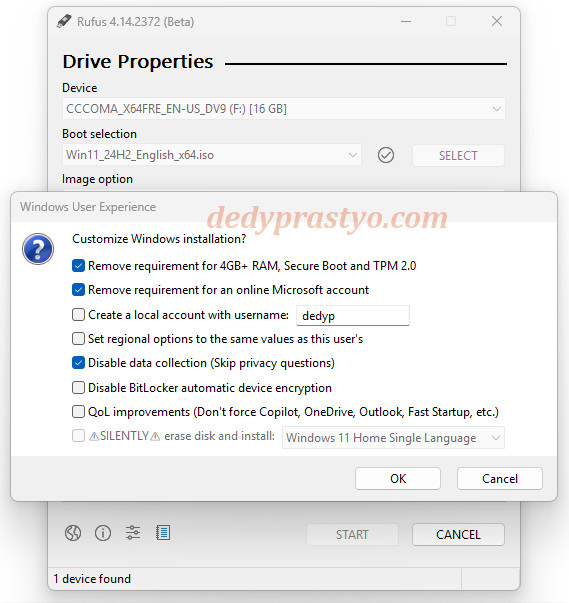
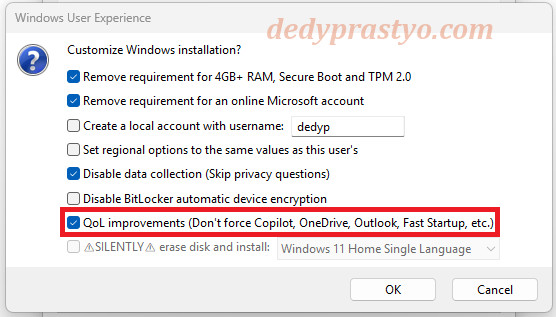
Remove Bloatware from Windows with Rufus - To remove bloatware from Windows checking QoL Improvement (Don’t force Copilot, OneDrive, Outlook, FastStartup, etc) option.
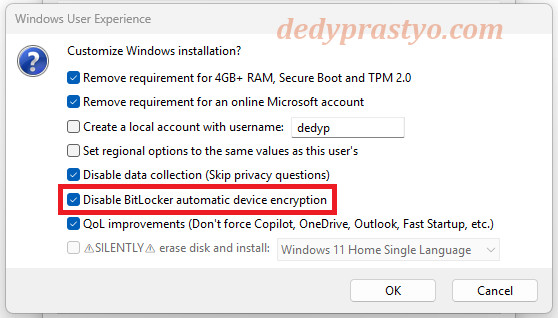
Remove Bloatware from Windows with Rufus - You can also disable BitLocker drive encryption by checking option Disable BitLocker automatic device encryption.
Disable BitLocker from Windows with Rufus - Click OK to start burn your ISO to bootable USB device. Use the USB to install Windows on your machine.
- After installation finished you newly installed Windows will have no annoying bloatware such as Copilot.
Feel free to share this article if you find it useful. Enjoy Remove Bloatware from Windows with Rufus and stay awesome.
🙂